Print free Threeef bingo cards or modify,
limitless cards! Pick from 42,200+ designs or use the bingo card generator.
Add numbers, phrases, pictures, or all of them.
Play using printed PDF, virtual bingo cards,
and the virtual bingo caller, or combine all formats.
About: This bingo card is perfect for a lively friends’ get-together or game night with your favorite crew. It captures all the classic quirks, inside jokes, and recurring antics you’ve come to expect from your group. The tone is playful and a little cheeky, making it an ideal way to add extra laughs and fun to any gathering.
How To: To download a PDF to print, click the Print button.
You can alter the card quantity and other
printing options on the Print tab.
Grid items and free space content can be edited on the Basic tab.
Appearance can be fully personalized on the
corresponding tabs, or you can easily search any option
on the 🔍 tab.
How to play Threeef Bingo Cards?
Digital Caller: Click on the Play button above.
Digital Players: Click on the Play button above, and then click on the 🎫 button.
Printed Players: Print PDF bingo cards and physically mark the cards.
Printed Caller: Print PDF calling list & calling slips and physically choose the slips.
Mixed Mode: Choose any combination above.
For instance, caller can be either Offline or Digital.
And players can be Offline or Digital or a mix of both.
Step-By-Step:
Start by getting the Threeef PDF by clicking on the "Print" button above.
Open the PDF and print it.
For random calling, you can print another copy of the call list, cut, fold and then pick them randomly at play time.
Cut the bingo cards at the cut marks if there are greater than 1 bingo cards per page.
Distribute one card per player. For marking, you can use pencils. Crayons are the cheapest.
Choose one person to be the caller. If you are playing in a small group, the caller may as well play along with their own Bingo card.
The caller starts the play by randomly drawing an item from the call list and calling out it to all players.
The players scan their cards to see if they have the announced word. If they do, they mark that word.
The first player to finish a horizontal, vertical, or a diagonal line of crossed items announces "Bingo!" and wins the game.
The caller validates that the items crossed off form a proper line as per the Bingo card and call list.
You can play for different patterns or a full card blackout for an extended game.
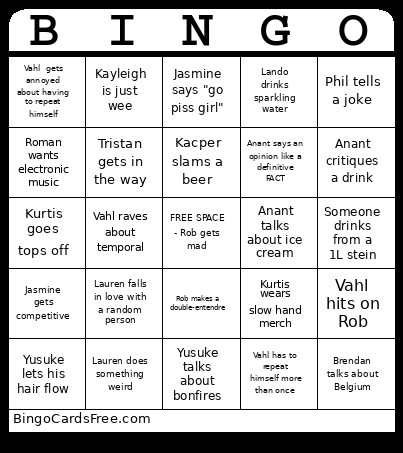
This Threeef Bingo Cards Game contains following Words or Phrases: Yusuke lets his hair flow, Broken glass!, Lauren does something weird, Kacper slams a beer, Jess talks about traveling, Rob talks about sports to someone who doesn't care, Amelia shows cat pics, Lando wears sunnies inside, Jasmine says "go piss girl", Jasmine plays King Princess, Kurtis wears slow hand merch, Someone drinks from a 1L stein, Tristan brewery tour, Anant talks about ice cream, Vahl raves about temporal, Lando drinks sparkling water, Yusuke talks about bonfires, Rob makes a double-entendre, Jess talks about cosmetics <3, Phil tells a joke, Drink spill!, SHOTS, A board/card game ends midway through, Vahl hits on Rob, Shell gets British, Someone shows up late, Amelia gets Chemelia, Wesley sits on the floor, Wesley thinks the drinks are too strong, Roman dances, Anant critiques a drink, Roman wants electronic music, Kayleigh is just wee, Michelle head butts someone, Michelle stretches/high kicks, Vahl has to repeat himself more than once, Vahl gets annoyed about having to repeat himself, Anant says an opinion like a definitive FACT, Jasmine gets competitive, Jasmine says something inappropriate, Lauren falls in love with a random person, Rob forgets a noun, Tristan overexplains a beer, Brendan talks about Belgium, Kurtis goes tops off, Tristan gets in the way, Sky drinks n/a bevvie.

 This Threeef Bingo Cards Game contains following Words or Phrases: Yusuke lets his hair flow, Broken glass!, Lauren does something weird, Kacper slams a beer, Jess talks about traveling, Rob talks about sports to someone who doesn't care, Amelia shows cat pics, Lando wears sunnies inside, Jasmine says "go piss girl", Jasmine plays King Princess, Kurtis wears slow hand merch, Someone drinks from a 1L stein, Tristan brewery tour, Anant talks about ice cream, Vahl raves about temporal, Lando drinks sparkling water, Yusuke talks about bonfires, Rob makes a double-entendre, Jess talks about cosmetics <3, Phil tells a joke, Drink spill!, SHOTS, A board/card game ends midway through, Vahl hits on Rob, Shell gets British, Someone shows up late, Amelia gets Chemelia, Wesley sits on the floor, Wesley thinks the drinks are too strong, Roman dances, Anant critiques a drink, Roman wants electronic music, Kayleigh is just wee, Michelle head butts someone, Michelle stretches/high kicks, Vahl has to repeat himself more than once, Vahl gets annoyed about having to repeat himself, Anant says an opinion like a definitive FACT, Jasmine gets competitive, Jasmine says something inappropriate, Lauren falls in love with a random person, Rob forgets a noun, Tristan overexplains a beer, Brendan talks about Belgium, Kurtis goes tops off, Tristan gets in the way, Sky drinks n/a bevvie.