
Unfinished Business TAR Bingo Cards - Print Free or Customize
Print free Unfinished Business TAR bingo cards or customize, limitless cards! Choose from 42,200+ templates or use our bingo card generator. Add numbers, words, photos, or all of them. Play using printable PDF, online bingo cards, and our online bingo caller, or mix physical and digital.
About: This bingo card captures all the wild chaos, drama, and unexpected twists of a Discord-based Amazing Race game. Perfect for superfans, participants, or viewers, it highlights everything from tech breakdowns to fierce rivalries and production hiccups. Get ready to laugh, groan, and call out the most iconic (and infamous) moments as your virtual race unfolds!
How To: To get a printable PDF, click the Print button. You can modify the card count and other printing preferences on the Print tab. Grid items and free space content can be added on the Basic tab. Appearance can be highly personalized on the relevant tabs, or you can easily locate any option using the 🔍 tab.
How to play Unfinished Business TAR Bingo Cards?
- Digital Players: Click on the Play button above, and then click on the 🎫 button.
- Digital Caller: Click on the Play button above.
- Paper Players: Print PDF bingo cards and manually scratch the cards.
- Paper Caller: Print PDF calling list & calling slips and manually pick the slips.
- Mixed Mode: Choose any combination above. For example, caller can be either Offline or Digital. And players can be Offline or Digital or a combo of both.
Step-By-Step:
- Start by saving the Unfinished Business TAR PDF by clicking on the "Print" button above.
- Open the PDF and print it.
- For random calling, you can print another copy of the call list, cut, fold and then pick them randomly at play time.
- Cut the bingo cards at the cut marks if there are greater than 1 bingo cards per page.
- Give one card to each player. For marking, you can use pens. Crayons are the cheapest.
- Choose one person to be the caller. If you are playing in a small group, the caller can as well play along with their own Bingo card.
- The caller initiates the play by randomly drawing an item from the call list and announcing it to everyone.
- The players check their cards to see if they have the announced word. If they do, they dab that word.
- The first player to complete a horizontal, vertical, or a diagonal line of marked items yells "Bingo!" and wins the game.
- The caller validates that the items crossed off form a correct line according to the Bingo card and call list.
- You can play for different patterns or a full card blackout for an extended game.
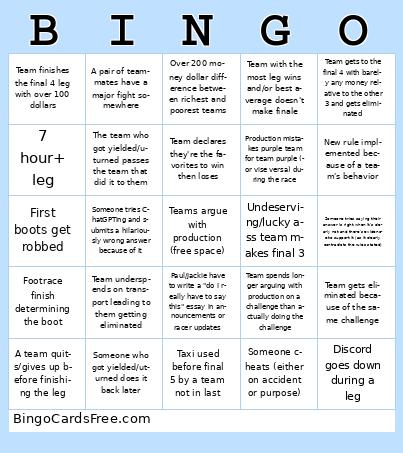 This Unfinished Business TAR Bingo Cards Game contains following Words or Phrases: 2nd place gets the 2nd express pass, 3+ hour difference between first and last in a leg, 7 hour+ leg, A bot (Dyno, YAG) being used goes down during the leg, A challenge has wrong answers or is basically impossible (unintentional difficulty), A pair of teammates have a major fight somewhere, A racer says seriously that the org is rigged, A team gives or tries to give another team money for some reason, A team has an epic rage meltdown/quit upon losing, A team quits/gives up before finishing the leg, A team tells another team the wrong answers, Discord goes down during a leg, Final 3 is predictable and it's who most people drafted, First boots get robbed, First coming into the last challenge in a leg gets eliminated, First place finishes ahead by over an hour during a leg, Footrace finish determining the boot, Last place and 2nd to last are close to each other but finish an hour behind everyone else, Leg 1 is not the longest leg, Mine 5 occurs, New rule implemented because of a team's behavior, One or more of the first 5 legs finishes in under 5 hours, One team does a challenge in 5 minutes, another does the same in an hour+, Over 200 money dollar difference between richest and poorest teams, Paul/Jackie have to write a "do I really have to say this" essay in announcements or racer updates, Prod member (not named Jackie) quits due to drama or fight with racers, Production member gets fired mid-season, Production mistakes purple team for team purple (or vise versa) during the race, Public fight between teams in a hotel or airport chat, Read your clue!, Someone cheats (either on accident or purpose), Someone gets replaced mid-race, Someone tries ChatGPTing and submits a hilariously wrong answer because of it, Someone tries saying their answer is right when it's clearly not and there's evidence to support it (as it clearly contradicts the rules stated), Someone tries walking over 1 hour, Someone who got yielded/uturned does it back later, Survivor: Game Changers-tier bad boot order, Taxi gets used on leg 1, Taxi used before final 5 by a team not in last, Team actually learned from their mistake and crushes their unfinished business challenge, Team barely or doesn't socialize at all, Team declares they're the favorites to win then loses, Team doesn't show up for more than 30 minutes after the leg started, Team finishes the final 4 leg with over 100 dollars, Team gets eliminated because of the same challenge, Team gets fucked by low/$1 payout, Team gets to the final 4 with barely any money relative to the other 3 and gets eliminated, Team guesses the answer within 5 minutes to a challenge without actually knowing the process of solving it or figuring it out, Team loses due to inactivity, Team opens a clue early, Team solves the hard part of the challenge quickly but is slow af in the easy part, Team spends longer arguing with production on a challenge than actually doing the challenge, Team takes two or more penalties in the same leg on Sunday, Team taxis in first, Team underspends on transport leading to them getting eliminated, Team vastly over or underestimates what place they're in, Team with the most leg wins and/or best average doesn't make finale, Teams from the same original season form a close alliance, The finale result is scuffed, The obvious frontrunner(s) somehow don't get targeted either socially or by U-turns/yields and get to the finale with no problems, The team who got yielded/u-turned passes the team that did it to them, Undeserving/lucky ass team makes final 3, Using a car when bike/bus is like 2 minutes slower.