Veal Basement 1 Bingo Cards - Print Free or Customize
Print free Veal Basement 1 bingo cards or personalize,
unlimited cards! Choose from 42,200+ templates or use the bingo card generator.
Add numbers, words, photos, or mix them all.
Play using printable PDF, digital bingo cards,
and the digital bingo caller, or go hybrid.
About: This bingo card captures all the classic moments and running jokes that make your annual March Madness watch party feel like home. From familiar family quirks and inside jokes to basketball banter and snack breaks, it’s perfect for friends or family gatherings where NCAA hoops share the stage with laughter and lively debates.
How To: To download a PDF to print, click the Print button.
You can change the number of cards and other
printing options on the Print tab.
Grid items and free space content can be changed on the Basic tab.
Appearance can be totally customized on the
relevant tabs, or you can easily locate any setting
using the 🔍 tab.
How to play Veal Basement 1 Bingo Cards?
Virtual Players: Click on the Play button above, and then click on the 🎫 button.
Virtual Caller: Click on the Play button above.
Printed Players: Print PDF bingo cards and manually cross off the cards.
Printed Caller: Print PDF calling list & calling slips and manually choose the slips.
Combo Mode: Select any combination above.
For example, caller can be either Paper or Virtual.
And players can be Paper or Virtual or a combo of both.
Step-By-Step:
Start by getting the Veal Basement 1 PDF by clicking on the "Print" button above.
Open the PDF and print a hard copy.
For random calling, you can print another copy of the call list, cut, fold and then pull them randomly at play time.
Cut the bingo cards at the cut lines if there are more than 1 bingo cards per page.
Give one card to each player. For marking, you can use crayons. Crayons are the cheapest.
Select one person to be the caller. If you are playing in a small group, the caller can also play along with their own Bingo card.
The caller starts the game by randomly pulling an item from the call list and calling out it to everyone.
The players look at their cards to see if they have the announced word. If they do, they cross off that word.
The first player to complete a horizontal, vertical, or a diagonal line of crossed items yells "Bingo!" and wins the game.
The caller validates that the items crossed off form a proper line as per the Bingo card and call list.
You can play for multiple patterns or a full card blackout for a longer game.
This Veal Basement 1 Bingo Cards Game contains following Words or Phrases: Someone asks Dave about High School Basketball, Nate complains about halves instead of Quarters, Jeffs voice cracks, Vlad Appearance, 4 commercials on (during 4 games), Daniel mispronounces something, Someone asks what TV the sounds is on, Someone complains that the sound is on a commercial, Jeff says "Hey Name...See ya" while their going up the stiars, Blaigh talks about Jeff getting a tattoo, Purdue losing in March joke, Darian DeVries discourse, Sam Young extended "Uhhhhhhhh", someone asks about the March setup in the new house, Marys crush on Shaka Smart mentioned, Mary brings down cookies, Comment about Jeff or Joes Hearing Aids, Larry Hanni Mentioned, Someone talks about their bracket, Someone asks how to pronounce a players name, Someone falls asleep (watch for JP and joe????), Complaint about Fletcher Loyer, IU not playing Joke, Question about the College Basketball Crown, Negative comment about Calipari, Joke about hitting head on ceiling, Daniel and Jeff get in an argument, Drink Spilled, Jeff has everyone clap for a person when the enter the basement, Someone throws a mini basketball at you.

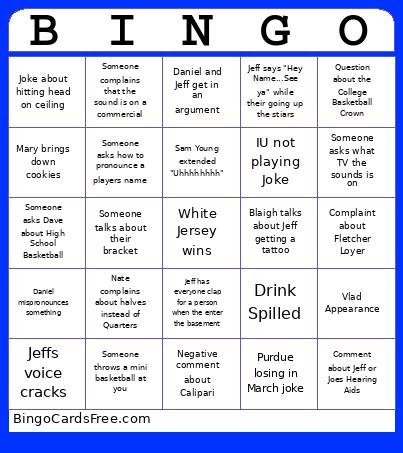 This Veal Basement 1 Bingo Cards Game contains following Words or Phrases: Someone asks Dave about High School Basketball, Nate complains about halves instead of Quarters, Jeffs voice cracks, Vlad Appearance, 4 commercials on (during 4 games), Daniel mispronounces something, Someone asks what TV the sounds is on, Someone complains that the sound is on a commercial, Jeff says "Hey Name...See ya" while their going up the stiars, Blaigh talks about Jeff getting a tattoo, Purdue losing in March joke, Darian DeVries discourse, Sam Young extended "Uhhhhhhhh", someone asks about the March setup in the new house, Marys crush on Shaka Smart mentioned, Mary brings down cookies, Comment about Jeff or Joes Hearing Aids, Larry Hanni Mentioned, Someone talks about their bracket, Someone asks how to pronounce a players name, Someone falls asleep (watch for JP and joe????), Complaint about Fletcher Loyer, IU not playing Joke, Question about the College Basketball Crown, Negative comment about Calipari, Joke about hitting head on ceiling, Daniel and Jeff get in an argument, Drink Spilled, Jeff has everyone clap for a person when the enter the basement, Someone throws a mini basketball at you.