weddingbingoattempt1 Cards - Print Free or Customize
Print free weddingbingoattempt1 cards or customize,
unlimited prints! Select from 42,200+ designs or use our bingo card generator.
Add numbers, words, pictures, or all of them.
Play using printable PDF, online bingo cards,
and our online bingo caller, or combine all formats.
About: This bingo card is perfect for a lively wedding celebration in Breckenridge, filled with inside jokes, local flair, and interactive challenges that encourage guests to mingle and create unforgettable memories. From quirky drink-related dares to fun ways of connecting with fellow attendees, it's designed to break the ice and keep the energy up throughout the night.
How To: To get a PDF to print, click the Print button.
You can change the number of cards and other
print settings on the Print tab.
Grid items and free space content can be edited on the Basic tab.
Appearance can be totally customized on the
relevant tabs, or you can quickly find any preference
using the 🔍 tab.
How to play weddingbingoattempt1 Cards?
Virtual Players: Click on the Play button above, and then click on the 🎫 button.
Paper Caller: Print PDF calling list & calling slips and manually choose the slips.
Virtual Caller: Click on the Play button above.
Paper Players: Print PDF bingo cards and manually write on the cards.
Hybrid Play: Choose any combination above.
For example, caller can be either Offline or Virtual.
And players can be Offline or Virtual or a combination of both.
Step-By-Step:
Start by downloading the weddingbingoattempt1 PDF by clicking on the "Print" button above.
Open the PDF and print a hard copy.
For random calling, you can print another copy of the call list, cut, fold and then pull them randomly at play time.
Cut the bingo cards at the cut marks if there are greater than 1 bingo cards per page.
Give one card to each player. For marking, you can use crayons. Crayons cost the least.
Choose one person to be the caller. If you are playing in a small group, the caller may also play along with their own Bingo card.
The caller opens the game by randomly picking an item from the call list and announcing it to all players.
The players check their cards to see if they have the announced word. If they do, they dab that word.
The first player to finish a horizontal, vertical, or a diagonal line of crossed items shouts "Bingo!" and wins the game.
The caller verifies that the items crossed off form a correct line as per the Bingo card and call list.
You can play for varied patterns or a full card blackout for an extended game.
This weddingbingoattempt1 Cards Game contains following Words or Phrases: Ride the gondola, Espresso shot at Ulr, Splashdown in die tournament or cocktail hour, Knuckles with Layton, Finish a distillery cocktail, Land a die toss on a table, Down the seltzer, Toss cornhole, Bag in the hole - cornhole, Finish a water, Eat a cookie with milk, Bring someone to the dance floor, Cheers an FMHS grad, Cheers with an AHS grad, Get a grinnellian to take a chug from your beverage, Ice someone, Roll a die for a sip with a Grinnellian, Take an oxygen hit, Shake hands with a Bess, Shake hands with a Hautzinger, Find a CU grad, Cheers with two people with the same middle name, Toast to your table, Rock paper scissors a stranger: loser sips, Finish a drink with a former roommate of Ryan, Cheers with two Wildcats, Give one of the couple's mothers a hug, Give the bride a snack, Hail Mary with anyone who shares a name with a disciple, Share a fridge cigarette with a member of the supper club, Have a Shannon initial here:, Make a slogan with the initials of every person at your dinner table, Try every drink the reception bar offers, Finish the seltzer, Hop on the Breck trolly, Grab a beer at Napper Tandy's, Find a wedding guest who owns a non-American passport, Find an attendee of the Hautzinger House Party, Find someone with a 802** zipcode, Find someone with a 970 #, Get a strangers social media, Walk along the Blue River [thats in downtown breck right?], Take a picture with [Insert landmark in downtown breck].

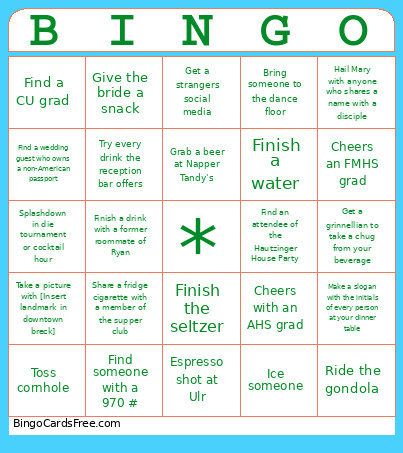 This weddingbingoattempt1 Cards Game contains following Words or Phrases: Ride the gondola, Espresso shot at Ulr, Splashdown in die tournament or cocktail hour, Knuckles with Layton, Finish a distillery cocktail, Land a die toss on a table, Down the seltzer, Toss cornhole, Bag in the hole - cornhole, Finish a water, Eat a cookie with milk, Bring someone to the dance floor, Cheers an FMHS grad, Cheers with an AHS grad, Get a grinnellian to take a chug from your beverage, Ice someone, Roll a die for a sip with a Grinnellian, Take an oxygen hit, Shake hands with a Bess, Shake hands with a Hautzinger, Find a CU grad, Cheers with two people with the same middle name, Toast to your table, Rock paper scissors a stranger: loser sips, Finish a drink with a former roommate of Ryan, Cheers with two Wildcats, Give one of the couple's mothers a hug, Give the bride a snack, Hail Mary with anyone who shares a name with a disciple, Share a fridge cigarette with a member of the supper club, Have a Shannon initial here:, Make a slogan with the initials of every person at your dinner table, Try every drink the reception bar offers, Finish the seltzer, Hop on the Breck trolly, Grab a beer at Napper Tandy's, Find a wedding guest who owns a non-American passport, Find an attendee of the Hautzinger House Party, Find someone with a 802** zipcode, Find someone with a 970 #, Get a strangers social media, Walk along the Blue River [thats in downtown breck right?], Take a picture with [Insert landmark in downtown breck].