Print free bingot cards or modify,
unlimited prints! Pick from 42,200+ designs or use the bingo card generator.
Add numbers, phrases, photos, or mix them all.
Play using PDF printouts, digital bingo cards,
and the digital bingo caller, or go hybrid.
About: This bingo card captures the playful chaos and inside jokes of a close-knit tabletop gaming group. Packed with references to recurring personalities, unique catchphrases, and friendly banter, it's perfect for game nights or meetups where everyone’s in on the fun. Expect plenty of laughter as players spot familiar antics unfold in real time.
How To: To download a PDF to print, click the Print button.
You can adjust the card quantity and other
print preferences on the Print tab.
Grid items and free space content can be added on the Basic tab.
Appearance can be completely personalized on the
relevant tabs, or you can quickly locate any setting
using the 🔍 tab.
How to play Bingot Cards?
Printed Caller: Print PDF calling list & calling slips and physically select the slips.
Printed Players: Print PDF bingo cards and physically cross off the cards.
Virtual Players: Click on the Play button above, and then click on the 🎫 button.
Virtual Caller: Click on the Play button above.
Hybrid Mode: Pick any combination above.
For example, caller can be either Offline or Virtual.
And players can be Offline or Virtual or a combination of both.
Step-By-Step:
Start by getting the Bingot PDF by clicking on the "Print" button above.
Open the PDF and print it.
For random drawing, you can print another copy of the call list, cut, fold and then pick them randomly at play time.
Cut the bingo cards at the cut lines if there are greater than 1 bingo cards per page.
Give one card to each player. For marking, you can use pens. Crayons cost the least.
Pick one person to be the caller. If you are playing in a small group, the caller can as well play along with their own Bingo card.
The caller starts the play by randomly pulling an item from the call list and saying it to everyone.
The players look at their cards to see if they have the called word. If they do, they dab that word.
The first player to complete a horizontal, vertical, or a diagonal line of marked items shouts "Bingo!" and wins the game.
The caller checks that the items crossed off form a proper line according to the Bingo card and call list.
You can play for varied patterns or a full card blackout for an extended game.
This Bingot Cards Game contains following Words or Phrases: A reference to a past meetup is made, Aron intentionally doesn't listen to Tim, Aron is wordlessly annoyed, Aron makes an illogical play because reasons, Aron or John puts down a game, Aron says something he thinks is profound but isn't, Aron trusts what John says when he shouldn't, Australian rules joke, Big Mike says something "classy", Brent is called something other than his name, Charles comes in, Hero Quest is put down, How much damage - 2, It's a clue, It's a soft rule, John dick sucking joke, John fucks with the game for no reason, John is a table, John says it's kind of stupid, Margot or anyone believes something they shouldnt, Margot says something fancy, Mike and Tim argue like parents, Mike Kelly is used as a verb, Mike Kelly the verb, Our table wasn't reserved, RTFC, Secretly do it secretly, Smash Bro's group reference, So here's the thing, Soft chubs is mentioned, Someone has to explain we are playing Bingo(t), Someone obviously reveals a role, Someone sing songs a rule as a lyric, Someone takes the joke way too far, Something is said with a stupid accent, Strategery, The same rule is repeated 3 times in 5 minutes, Tim is "Daddy", Tim loses his patience, Tim reacts with you're _______., Tim says something to antagonize, Trolling for starting card, Waiting for someone in the bathroom, With a silent T.

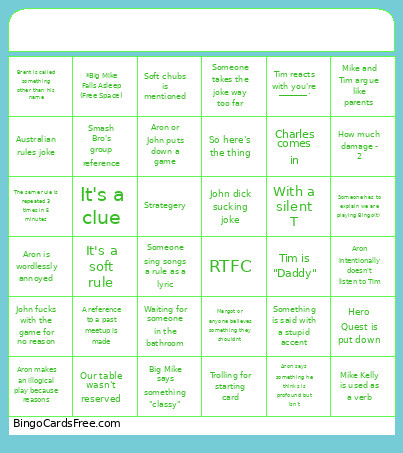 This Bingot Cards Game contains following Words or Phrases: A reference to a past meetup is made, Aron intentionally doesn't listen to Tim, Aron is wordlessly annoyed, Aron makes an illogical play because reasons, Aron or John puts down a game, Aron says something he thinks is profound but isn't, Aron trusts what John says when he shouldn't, Australian rules joke, Big Mike says something "classy", Brent is called something other than his name, Charles comes in, Hero Quest is put down, How much damage - 2, It's a clue, It's a soft rule, John dick sucking joke, John fucks with the game for no reason, John is a table, John says it's kind of stupid, Margot or anyone believes something they shouldnt, Margot says something fancy, Mike and Tim argue like parents, Mike Kelly is used as a verb, Mike Kelly the verb, Our table wasn't reserved, RTFC, Secretly do it secretly, Smash Bro's group reference, So here's the thing, Soft chubs is mentioned, Someone has to explain we are playing Bingo(t), Someone obviously reveals a role, Someone sing songs a rule as a lyric, Someone takes the joke way too far, Something is said with a stupid accent, Strategery, The same rule is repeated 3 times in 5 minutes, Tim is "Daddy", Tim loses his patience, Tim reacts with you're _______., Tim says something to antagonize, Trolling for starting card, Waiting for someone in the bathroom, With a silent T.