Print free necorphitusbingo cards or adjust them,
limitless cards! Choose from 42,200+ templates or use the bingo card generator.
Add numbers, phrases, photos, or all of them.
Play using printed PDF, digital bingo cards,
and the digital bingo caller, or go hybrid.
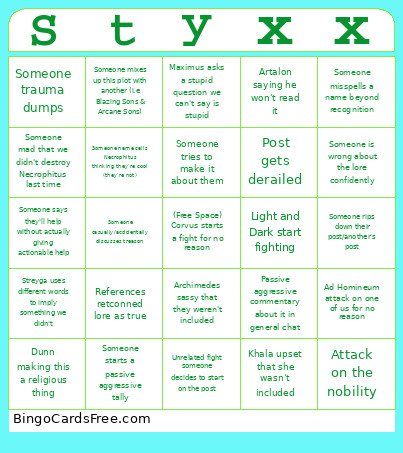
About: This bingo card captures the delightful chaos of an active lore or roleplay community, perfect for tracking those classic group chat moments that send discussions off the rails. With playful nods to in-jokes, dramatic arguments, and relatable miscommunications, it’s a great fit for any group of storytellers, writers, or online RPG fans ready to laugh at themselves.
How To: To save a printable PDF, click the Print button.
You can modify the card count and other
print preferences on the Print tab.
Grid items and free space content can be changed on the Basic tab.
Appearance can be totally personalized on the
corresponding tabs, or you can quickly locate any option
on the 🔍 tab.
How to play necorphitusbingo Cards?
Online Players: Click on the Play button above, and then click on the 🎫 button.
Online Caller: Click on the Play button above.
Printed Caller: Print PDF calling list & calling slips and manually draw the slips.
Printed Players: Print PDF bingo cards and manually scratch the cards.
Hybrid Play: Select any combination above.
For example, caller can be either Paper or Online.
And players can be Paper or Online or a combo of both.
Step-By-Step:
Start by downloading the necorphitusbingo PDF by clicking on the "Print" button above.
Open the PDF and print a hard copy.
For random drawing, you can print another copy of the call list, cut, fold and then pick them randomly at play time.
Cut the bingo cards at the cut lines if there are more than 1 bingo cards per page.
Distribute one card per player. For marking, you can use crayons. Crayons cost the least.
Select one person to be the caller. If you are playing in a small group, the caller may also play along with their own Bingo card.
The caller begins the game by randomly pulling an item from the call list and saying it to everyone.
The players scan their cards to see if they have the called word. If they do, they mark that word.
The first player to finish a horizontal, vertical, or a diagonal line of marked items shouts "Bingo!" and wins the play.
The caller validates that the items marked form a proper line according to the Bingo card and call list.
You can play for varied patterns or a full card blackout for an extended play.
This necorphitusbingo Cards Game contains following Words or Phrases: Ad Homineum attack on one of us for no reason, Archimedes sassy that they weren't included, Artalon saying he won't read it, Attack on the nobility, Can we fix him?, Diane says something that is not at all related, Dunn making this a religious thing, Elias tries to give tactical information that won't apply, Khala upset that she wasn't included, Light and Dark start fighting, Maximus asks a stupid question we can't say is stupid, Passive aggressive commentary about it in general chat, Post gets derailed, References retconned lore as true, Someone asking if the gods will be back this time, Someone asks a question that we answered in the post, Someone casually/accidentally discusses treason, Someone claims they're not involved/ don't have to care, Someone insults the fey, Someone is angry that they can't use weave breaking magic to help, Someone is wrong about the lore confidently, Someone mad that we didn't destroy Necrophitus last time, Someone makes a tone deaf joke, Someone misspells a name beyond recognition, Someone mixes up this plot with another (i.e Blazing Sons & Arcane Sons), Someone name calls Necrophitus thinking they're cool (they're not), Someone opening a lore can of wyrms we want closed, Someone rips down their post/another's post, Someone says they'll help without actually giving actionable help, Someone starts a passive aggressive tally, Someone trauma dumps, Someone tries to make it about them, Someone tries to take over, Someone uses spoilers or bold text to talk about mechanics on an IG post, Someone who's met Corsair like one time tries to be his best friend, Someone writes a poem, Streyga uses different words to imply something we didn't, Unrelated fight someone decides to start on the post.

 This necorphitusbingo Cards Game contains following Words or Phrases: Ad Homineum attack on one of us for no reason, Archimedes sassy that they weren't included, Artalon saying he won't read it, Attack on the nobility, Can we fix him?, Diane says something that is not at all related, Dunn making this a religious thing, Elias tries to give tactical information that won't apply, Khala upset that she wasn't included, Light and Dark start fighting, Maximus asks a stupid question we can't say is stupid, Passive aggressive commentary about it in general chat, Post gets derailed, References retconned lore as true, Someone asking if the gods will be back this time, Someone asks a question that we answered in the post, Someone casually/accidentally discusses treason, Someone claims they're not involved/ don't have to care, Someone insults the fey, Someone is angry that they can't use weave breaking magic to help, Someone is wrong about the lore confidently, Someone mad that we didn't destroy Necrophitus last time, Someone makes a tone deaf joke, Someone misspells a name beyond recognition, Someone mixes up this plot with another (i.e Blazing Sons & Arcane Sons), Someone name calls Necrophitus thinking they're cool (they're not), Someone opening a lore can of wyrms we want closed, Someone rips down their post/another's post, Someone says they'll help without actually giving actionable help, Someone starts a passive aggressive tally, Someone trauma dumps, Someone tries to make it about them, Someone tries to take over, Someone uses spoilers or bold text to talk about mechanics on an IG post, Someone who's met Corsair like one time tries to be his best friend, Someone writes a poem, Streyga uses different words to imply something we didn't, Unrelated fight someone decides to start on the post.