Thanksgiving 2025 Bingo Cards - Print Free or Customize
Print free Thanksgiving 2025 bingo cards or alter them,
unlimited prints! Choose from 42,200+ designs or use the bingo card generator.
Add numbers, phrases, images, or any combination.
Play using printed PDF, digital bingo cards,
and the digital bingo caller, or combine all formats.
About: This bingo card perfectly captures the chaos, inside jokes, and memorable moments of a big family get-together or holiday reunion. It’s full of those funny little incidents and recurring traditions everyone in the family will recognize. Ideal for adding some extra fun to your next gathering, this card celebrates all the quirks that make your crew unique.
How To: To download a printable PDF, click the Print button.
You can adjust the card count and other
printing options on the Print tab.
Grid items and free space content can be added on the Basic tab.
Appearance can be exactly personalized on the
corresponding tabs, or you can easily find any option
using the 🔍 tab.
How to play Thanksgiving 2025 Bingo Cards?
Printed Caller: Print PDF calling list & calling slips and physically pick the slips.
Digital Players: Click on the Play button above, and then click on the 🎫 button.
Printed Players: Print PDF bingo cards and physically write on the cards.
Digital Caller: Click on the Play button above.
Hybrid Play: Select any combination above.
For example, caller can be either Printed or Digital.
And players can be Printed or Digital or a combination of both.
Step-By-Step:
Start by downloading the Thanksgiving 2025 PDF by clicking on the "Print" button above.
Open the PDF and print a hard copy.
For random calling, you can print another copy of the call list, cut, fold and then draw them randomly at play time.
Cut the bingo cards at the cut lines if there are greater than 1 bingo cards per page.
Distribute one card per player. For marking, you can use crayons. Crayons cost the least.
Select one person to be the caller. If you are playing in a small group, the caller may also play along with their own Bingo card.
The caller opens the play by randomly drawing an item from the call list and announcing it to everyone.
The players scan their cards to see if they have the announced word. If they do, they cross off that word.
The first player to complete a horizontal, vertical, or a diagonal line of marked items announces "Bingo!" and wins the game.
The caller confirms that the items crossed off form a proper line as per the Bingo card and call list.
You can play for multiple patterns or a full card blackout for a longer game.
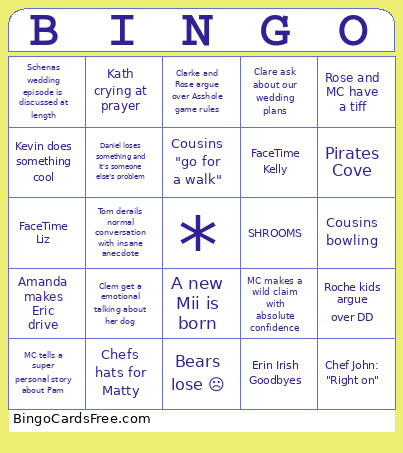
This Thanksgiving 2025 Bingo Cards Game contains following Words or Phrases: A new Mii is born, Amanda makes Eric drive, Bears lose ☹️, Bears win! 🏆, Brain and Michael smoke a cigar, Chef John gets Daniels name wrong, Chef John: "Right on", Chefs hats for Matty, Clare ask about our wedding plans, Clarke and Rose argue over Asshole game rules, Clem get a emotional talking about her dog, Cousins "go for a walk", Cousins bowling, Cousins reprimanded by LLL staff, Daniel gets the turkey drumstick, Daniel loses something and it's someone else's problem, Eric says "you got him for a second?" to a cousin, Erin Irish Goodbyes, FaceTime Bridget, FaceTime Kelly, FaceTime Liz, Jim makes a comment on the level of drink consumption, Kath crying at prayer, Kevin does something cool, MC makes a wild claim with absolute confidence, MC says she's rich, MC tells a super personal story about Pam, Pirates Cove, Roche kids argue over DD, Rose and MC have a tiff, Rose inexplicably disappears "to the bathroom" for 30+ minutes, Schenas wedding episode is discussed at length, SHOTS SHOTS SHOTS!!!!!, SHROOMS, Tom derails normal conversation with insane anecdote, Wii bowling.

 This Thanksgiving 2025 Bingo Cards Game contains following Words or Phrases: A new Mii is born, Amanda makes Eric drive, Bears lose ☹️, Bears win! 🏆, Brain and Michael smoke a cigar, Chef John gets Daniels name wrong, Chef John: "Right on", Chefs hats for Matty, Clare ask about our wedding plans, Clarke and Rose argue over Asshole game rules, Clem get a emotional talking about her dog, Cousins "go for a walk", Cousins bowling, Cousins reprimanded by LLL staff, Daniel gets the turkey drumstick, Daniel loses something and it's someone else's problem, Eric says "you got him for a second?" to a cousin, Erin Irish Goodbyes, FaceTime Bridget, FaceTime Kelly, FaceTime Liz, Jim makes a comment on the level of drink consumption, Kath crying at prayer, Kevin does something cool, MC makes a wild claim with absolute confidence, MC says she's rich, MC tells a super personal story about Pam, Pirates Cove, Roche kids argue over DD, Rose and MC have a tiff, Rose inexplicably disappears "to the bathroom" for 30+ minutes, Schenas wedding episode is discussed at length, SHOTS SHOTS SHOTS!!!!!, SHROOMS, Tom derails normal conversation with insane anecdote, Wii bowling.