Unique Kitchen Items Bingo Cards - Print Free or Customize
Print free Unique Kitchen Items bingo cards or alter them,
limitless cards! Pick from 42,200+ designs or use our bingo card generator.
Add numbers, words, photos, or any combination.
Play using PDF printouts, digital bingo cards,
and our digital bingo caller, or go hybrid.
About: This bingo card is a playful celebration of the most quirky and clever kitchen gadgets out there. Perfect for foodie friends, cooking clubs, or kitchen gadget parties, it adds fun to any gathering by highlighting both strange and handy tools that make meal prep a little more entertaining. Expect lots of laughs and “I’ve used that!” moments.
How To: To get a printable PDF, click the Print button.
You can adjust the card quantity and other
printing settings on the Print tab.
Grid items and free space text can be edited on the Basic tab.
Appearance can be exactly customized on the
corresponding tabs, or you can quickly search any preference
using the 🔍 tab.
How to play Unique Kitchen Items Bingo Cards?
Digital Players: Click on the Play button above, and then click on the 🎫 button.
Digital Caller: Click on the Play button above.
Paper Players: Print PDF bingo cards and physically cross off the cards.
Paper Caller: Print PDF calling list & calling slips and physically choose the slips.
Hybrid Mode: Select any combination above.
For instance, caller can be either Offline or Digital.
And players can be Offline or Digital or a mix of both.
Step-By-Step:
Start by getting the Unique Kitchen Items PDF by clicking on the "Print" button above.
Open the PDF and print a hard copy.
For random drawing, you can print another copy of the call list, cut, fold and then draw them randomly at play time.
Cut the bingo cards at the cut lines if there are greater than 1 bingo cards per page.
Give one card to each player. For marking, you can use crayons. Crayons are the cheapest.
Select one person to be the caller. If you are playing in a small group, the caller can as well play along with their own Bingo card.
The caller initiates the game by randomly picking an item from the call list and announcing it to all players.
The players look at their cards to see if they have the announced word. If they do, they mark that word.
The first player to finish a horizontal, vertical, or a diagonal line of crossed items yells "Bingo!" and wins the game.
The caller validates that the items marked form a proper line as per the Bingo card and call list.
You can play for varied patterns or a full card blackout for an extended game.
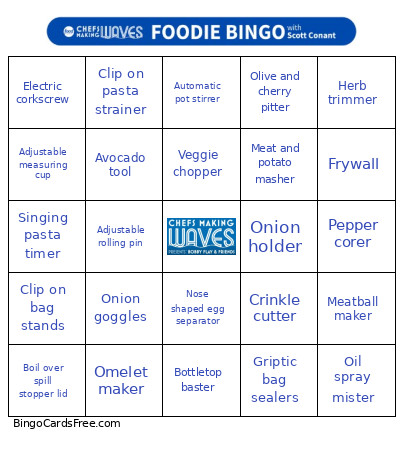
This Unique Kitchen Items Bingo Cards Game contains following Words or Phrases: Lemon sprayer, Onion goggles, Butter cutter/dispenser, Nose shaped egg separator, Egg cuber, Egg timer (color changing), Spaghetti twirling fork, Sushi mazooka, Meat shredding claws, Automatic potato peeler, Watermelon slicer tongs, Apple corer and slicer, Pie bird, Pickle jar, Clip on pasta strainer, Meat tenderizer hammer, Butter curler, Cheese curler, Potato ricer, Pineapple corer, Garlic roller peeler, Olive and cherry pitter, Herb trimmer, Radish rose cutter, Cheese knife with holes, Steak branding iron, Marinade injector syringe, Automatic pot stirrer, Meatball maker, Hamburger patty press, Singing pasta timer, Egg topper guillotine, Mushroom cleaning brus, Corn kernel stripper, Strawberry huller, Corn cob holders, Adjustable measuring cup, Jar opener, Splatypus, Banana corer, Frywall, Angry mama microwave cleaner, Taco holders, Herb scissors, Onion holder, Grape cutter, Veggie chopper, Spaghetti measurer, Never soggy cereal bowl, Ravioli rolling pin, Spice bomb, Griptic bag sealers, Avocado tool, Toss and chop salad tongs, Scrub daddy sponge, Clip on bag stands, Fold down bread slicer, Electric corkscrew, Omelet maker, Sandwich cutter and sealer, Adjustable rolling pin, Bread buddy, Salad spinner, Oil spray mister, Boil over spill stopper lid, Crinkle cutter, Electric can opener, Bottletop baster, Whisk wiper, Pancake batter bottle, Meat and potato masher, Cookie press, Rotary cheese grater, Pepper corer, Pizza scissors.

 This Unique Kitchen Items Bingo Cards Game contains following Words or Phrases: Lemon sprayer, Onion goggles, Butter cutter/dispenser, Nose shaped egg separator, Egg cuber, Egg timer (color changing), Spaghetti twirling fork, Sushi mazooka, Meat shredding claws, Automatic potato peeler, Watermelon slicer tongs, Apple corer and slicer, Pie bird, Pickle jar, Clip on pasta strainer, Meat tenderizer hammer, Butter curler, Cheese curler, Potato ricer, Pineapple corer, Garlic roller peeler, Olive and cherry pitter, Herb trimmer, Radish rose cutter, Cheese knife with holes, Steak branding iron, Marinade injector syringe, Automatic pot stirrer, Meatball maker, Hamburger patty press, Singing pasta timer, Egg topper guillotine, Mushroom cleaning brus, Corn kernel stripper, Strawberry huller, Corn cob holders, Adjustable measuring cup, Jar opener, Splatypus, Banana corer, Frywall, Angry mama microwave cleaner, Taco holders, Herb scissors, Onion holder, Grape cutter, Veggie chopper, Spaghetti measurer, Never soggy cereal bowl, Ravioli rolling pin, Spice bomb, Griptic bag sealers, Avocado tool, Toss and chop salad tongs, Scrub daddy sponge, Clip on bag stands, Fold down bread slicer, Electric corkscrew, Omelet maker, Sandwich cutter and sealer, Adjustable rolling pin, Bread buddy, Salad spinner, Oil spray mister, Boil over spill stopper lid, Crinkle cutter, Electric can opener, Bottletop baster, Whisk wiper, Pancake batter bottle, Meat and potato masher, Cookie press, Rotary cheese grater, Pepper corer, Pizza scissors.